TinyURL widget - shorten your URL's for free!

Enter a long URL to make tiny:

Thursday, March 26, 2015

Gnu Make real-time variable static library construction and testing

You can do a lot without automake, but I don't recommend it. In some cases it makes sense if you can isolate your work in development to simple lightweight fast code that doesn't have a lot of dependencies.

Also, GNU make is hard to learn without real examples.  The GNU suite of tools, GCC included is very steep learning for a beginner.  A lot of time is spent on head smashing against grammar errors.  Gnu tools are very unforgiving. I have learned by error and pattern more times than not.

So when I do things that are complicated, and use the special rules, I will try to pass on what I know by writing them down.

This code will appear in marrspace in the future.   I have off-lined this development in order to make sure this piece works first.  Once that's accomplished I will install the working code inside marrspace.

# Makefile for the messages that come out of the visual information message packages

# DRE 2015
# This library makes a C protocol buffers implementation for other code elsewhere.
# This nasty little subdir should be kept isolated as it deals with agnostic elements of a message protocol.
# that does not need localization because it is stripped away from operating system issues.
# It is a self contained message generation folder.
# that can make a library of messages if needed that can be referenced elsewhere.
# The makefile need only append more message types into MESSAGES and
# that will make a longer list of message elements compiled together.
# I made a test application for atof when it didn't convert large double values correctly, to check if you need strtod
#
# Self-contained testing can happen between msg1 that pipes to msg2 a generic message
# If the output looks like the input, the messages are working

MESSAGES = VMessage  FMessage  GMessage  LMessage  PMessage  MMessage WMessage

# redefine all message types as the final protocol-buffer autogenerated pb-c.c files that might not be present when the folder is spawned

MESSAGES_C = $(MESSAGES:=.pb-c.c)

# redefine all message types as protocol .proto files from the same root. This will tell you if the message is missing as well.
MESSAGES_P = $(MESSAGES:=.proto)
# redefine messages as object files.

MESSAGES_O = $(MESSAGES:=.pb-c.o)


CC = gcc
AR = ar
CFLAGS     = -I./
OBJ1     = msg1.o
OBJ2     = msg2.o

LIBS = -lprotobuf-c -lm libmessage.a

msg1: $(OBJ1)
    $(CC) -o $@ $^ $(MESSAGES_C) $(CFLAGS)  $(LIBS)

msg2: $(OBJ2)
    $(CC) -o $@ $^ $(MESSAGES_C) $(CFLAGS) $(LIBS)

libmessage:  VisObject.o $(MESSAGES_O)
    $(AR) ru  libmessage.a  VisObject.o $(MESSAGES_O)


test-atof: test-atof.o
    $(CC) -o $@ $^ $(CFLAGS) $(LIBS)

.PHONY:    clean check


list : $(MESSAGES_P)
    echo $(MESSAGES_C)
    echo $(MESSAGES_P)

messages :    $(MESSAGES_P)
    protoc-c --c_out=./ $(MESSAGES_P)

all :  messages  libmessage msg1 msg2

# tester recipe that creates the test case and sends data through and outputs to file test.out so you can review what was sent.
# we use the special case $(shell command) to send BASH a command line to execute.
check:  msg1 msg2
    $(shell ./msg1 1  23.44  34.55666 56566 43433.3 4545454.4 444444.5 9999999999999999999993.0  45   -7.777777777777777e1 | ./msg2 2> test.out  )


clean    :   
    rm -f *.o
    rm -f *.pb-c.c
    rm -f *.pb-c.h
    rm -fr *~
    rm -f msg1 msg2 test-atof
    rm -f test.out
    rm -f libmessage.a


    This is a modified version of yesterday's work.  Instead of making two programs with all the C object files, I use the AR archive program to make a static library that is linked to the programs.  Why static? Because it will be small and you want it to run fast.  Why make only? Because this code is agnostic because it references library dependencies that aren't unique apart from protocol buffers that are made generic.  Why C? Because the production system needs to run extremely fast. The marrspace library adds vertexes and lines to a rolling real time model of the visual scene.  I detest bloated C++ code so I am taking more time to make functions that will execute minimally.


To test the output of the piped message from msg1 to msg2 by using a phony recipe that runs the two programs with a canned set of data. 


I use the special $(shell) command to run in the shell's environment.  To call it phony means that make won't look for output files from the shell execution.  There is a test output .out made so one can review the messages passed and converted.  That's all you need for a production library.  GNU make is more powerful than people imagine, if only people have the time to read all the documentation.


Tuesday, March 24, 2015

Making auto substitutions in GNU Makefiles

One of the skills I stumbled with being a self-taught Unix programmer, was to uncover all the tricks that Unix style development has. 

If you make a makefile, and want to autocreate variables from a pattern, then you can use make's variable substitution to keep a growing list without needing automake. 

There are of course many places where the need for many libraries and so on won't make that a portable thing, you will have too many dependencies that creep in and spoil the simplicity. 

I was hit with the need to make a simple self-contained message protocol to pass data, and I started with Google's protocol buffers in C. 

Since those are simple self-contained protocols that pass data and depend on one library, I thought I could just get away with a Makefile for this subdir:

Here is the reference for substitution:

https://www.gnu.org/software/make/manual/html_node/Substitution-Refs.html#Substitution-Ref

here is the simple Makefile


MESSAGES = VMessage  FMessage  GMessage  LMessage  PMessage  MMessage WMessage
# redefine all message types as the final protocol-buffer autogenerated pb-c.c files that might not be present when the folder is spawned
MESSAGES_C = $(MESSAGES:=.pb-c.c)
# redefine all message types as protocol .proto files from the same root. This will tell you if the message is missing as well.
MESSAGES_P = $(MESSAGES:=.proto)

CC = gcc

CFLAGS     = -I./
OBJ1     = msg1.o
OBJ2     = msg2.o

LIBS = -lprotobuf-c

msg1: $(OBJ1)
    $(CC) -o $@ $^ $(MESSAGES_C) $(CFLAGS)  $(LIBS)

msg2: $(OBJ2)
    $(CC) -o $@ $^ $(MESSAGES_C) $(CFLAGS) $(LIBS)


list : $(MESSAGES_P)
    echo $(MESSAGES_C);
    echo $(MESSAGES_P);

messages :    $(MESSAGES)
    protoc-c --c_out=./ *.proto

all : messages msg1 msg2

.PHONY:    clean

clean    :  
    rm -f *.o
    rm -f *.pb-c.c
    rm -f *.pb-c.h
    rm -fr *~


To explain,   I define a message xMessage, and then the variable is subtstituted into $MESSAGES_C which places a .pb-c.c suffix onto the name of every message. 

The command

MESSAGES_C = $(MESSAGES:=.pb-c.c)

 defines a variable that takes every MESSAGES and adds a .pb-c.c variant that will be the autogenerated .c file from  'make messages'. These are generated from the protoc-c command.

The command

MESSAGES_P = $(MESSAGES:=.proto)
makes a similar .proto file variable if the prototype does not exist.  Why is this useful? Because what if you hadn't made all the messages first, or they were improperly defined, then your message library would be incomplete and might compile and execute leading to undefined behaviour.

One could change it to the other way around but what if I wanted a "ERROR" message as well, they don't have to follow a pattern.  The names don't have to be the same to work.  The library doesn't care but a human reader might.

Then it defines a dependency xMessage.proto which is the message prototype under the protocol buffers system to package a message.

Those are used as dependencies to make a simple message testing program set of msg1 and msg2.


Tuesday, March 10, 2015

How to import VCF cards into Mozilla Thunderbird

It seems odd that a major email application can't import the standard contact information file (.vcf) natively.  It's sad but true.

According to this support reply:

https://support.mozilla.org/en-US/questions/994358


vCard or .vcf
Some address book programs use a vCard format, which cannot be imported directly by Thunderbird. You can import both vCard and .vcf using the third-party Thunderbird extension 'MoreFunctionsForAddressBook'.
https://nic-nac-project.org/~kaosmos/morecols-en.html
  • download to desktop or 'downloads' folder on computer.
  • In Thunderbird. 'Tools' > 'Add-ons' to open 'Add-ons manager' in a new tab
  • click on the daisy wheel icon and select 'Install Addon from file
  • locate the .xpi file you downloaded
  • click on Open to install in Thunderbird
Save the vcard / .vcf attachment to eg: desktop
In Thunderbird:
  • open 'Address Book'
  • select the address book you want it to go to
  • 'Tools' > 'morefunctionforAddressBook' > 'Action for contacts' > 'Import vCard/vcf'
  • locate the saved vcard/.vcf file and click on 'Open'

Download the .xpi file form that website address and follow the installation instructions, then you need to restart Thunderbird.

NOTE: You need to save VCF cards to file and import them, this won't work natively from the email itself!!!


Thursday, March 5, 2015

How to clean inkscape SVG files

Inkscape sometimes makes SVG files with forbidden elements in them that epub readers might reject, Google epubchecker does not like inkscape:connector commands and fails with:


Error: Unable to sanitize epub

If you run it locally, it will fail with this error:


ERROR: *.svg(147,2722): attribute "inkscape:connector-curvature" not allowed here; expected attribute "class", "clip-path", "clip-rule", "color", "color-interpolation", "color-rendering", "cursor", "display", "externalResourcesRequired", "fill", "fill-opacity", "fill-rule", "filter", "image-rendering", "marker-end", "marker-mid", "marker-start", "mask", "onactivate", "onclick", "onfocusin", "onfocusout", "onload", "onmousedown", "onmousemove", "onmouseout", "onmouseover", "onmouseup", "opacity", "pathLength", "pointer-events", "requiredExtensions", "requiredFeatures", "shape-rendering", "stroke", "stroke-dasharray", "stroke-dashoffset", "stroke-linecap", "stroke-linejoin", "stroke-miterlimit", "stroke-opacity", "stroke-width", "style", "systemLanguage", "text-rendering", "transform", "visibility", "xml:base", "xml:lang" or "xml:space"


To get around this, download and compile SVG Cleaner.


https://github.com/RazrFalcon/SVGCleaner

https://launchpad.net/~svg-cleaner-team/+archive/ubuntu/svgcleaner

You will also need z7a   (7za-full on Ubuntu)

https://www.ibm.com/developerworks/community/blogs/6e6f6d1b-95c3-46df-8a26-b7efd8ee4b57/entry/how_to_use_7zip_on_linux_command_line144?lang=en


Friday, February 27, 2015

How to make a floating camera in OpenGL using C functions & GL_MODELVIEW matrix.

Here is a program you can compile to teach you how to make a camera float in an OpenGL scene. I won't claim I'm an expert in all things OpenGL, my first attempt didn't work so well.  But I stumbled on some code bits and cobbled them together.

If you want to use projective perspective and GL_MODELVIEW you can simply transform the camera.

Because the model view matrix has x and y along the 2D screen and negative z out from the viewpoint, two rotations have to be backward and all z-values must be negative and then it works as expected. The files have been changed to reflect this.

The GL_MODELVIEW matrix is already in the fixed coordinate frame of the camera. Simple apply a roll pitch and yaw.  I added xyz translations as well.

Oh, and I increase the Field of View (FOV) using Page UP Page DOWN to zoom in and zoom out.

Key Legend

 * Pitch - tilts camera up/down along current viewing port
 * Roll - rolls side to side like you were in a fighter jet
 * Yaw - turns "left" and "right" although technically it's rotation about an axis not turning
 
 * lz - into and out of the screen
 * lx - slide left and right frictionlessly
 * ly - hover or descend without gravity


Yaw   = Left/ Right Arrow
Pitch = Up / Down Arrow
Roll  =  Home / End Key

Z motion =  7 / 1 keys
Y motion = 8 / 2 keys
X motion = 4 / 6 keys

This is Lighthouse3D's original snow man example modified to use free camera rotations. Except his example forces the camera to the same plane.  You can find it here:

http://www.lighthouse3d.com/tutorials/glut-tutorial/keyboard-example-moving-around-the-world/


Here is a link to my C file:  https://www.dropbox.com/s/k7itn9qc45qvkez/opengl-floatingcamera.c?dl=0


/***\file opengl-floatingcamera.c   *********************************************************
                          
 H.File   $Header:  $
    
 Date Started: -2015

 Date:     $Date:  $
 *
 Author:  $Name:   $

 Purpose: Example OpenGL program showing how floating camera in MODELVIEW mode works.
 * It makes a floating camera using the C library and uses keys to change the relative
 * local frame motion of the camera.

 Version:  $Id: opengl-floatingcamera.c,v 1.2 2007/08/24 14:27:29 cvsuser Exp $

 Revision: $Revision:  $
 *
 *
 Log:   $Log:   $
 *
 * \brief
 * This file modifies the original file to demonstrate how to make a floating camera.
***************************************************************************/
// global library includes
#include <stdio.h>
#include <stdlib.h>
#include <string.h>
#include <math.h>
#include <GL/gl.h>
#include <GL/freeglut.h>
#include <GL/freeglut_ext.h>
#include <GL/freeglut_std.h>


// angle of rotation for the camera direction
float angle=0.0;
// actual vector representing the camera's direction
float lx = 0.0;
float ly = 0.0;
float lz = 10.0f;

// camera angles
float yaw = 0.0f;
float pitch = 0.0f;
float roll = 0.0f;


// Field of View
float FOV = 45.0;

// window dimensions
float w_height;
float w_width;


// new camera rotation system
void NewCameraTransformation( void );


/*
   Deal with plain key strokes
*/
void processNormalKeys(unsigned char key, int x, int y)
{
   switch (key)
   {
    case 27: /* ESC */
    case 'Q':
    case 'q': exit(0); break;
    case 's':
    case 'S': ; break;
    case 'b':
    case 'B': ; break;
    // translation keys  - pure location displacements
    case '8': ly -= 1; break;
    case '2': ly += 1; break;  
    case '4': lx += 1; break;   
    case '6': lx -= 1; break;
    case '7': lz += 1; break;   
    case '1': lz -= 1; break;   
   
   }
}


/*!  \fn ChangeWindowSize
 *
 * Updated Change size that takes into account modified window size
 *
 * */
void ChangeWindowSize(int w, int h)
{
    float ratio; // aspect ratio

    // Prevent a divide by zero, when window is too short
    // (you cant make a window of zero width)
    if(h == 0)
        h = 1;
    // get current window sizes    - not sent values
    w_width = glutGet(GLUT_WINDOW_WIDTH);
    w_height = glutGet(GLUT_WINDOW_HEIGHT);
    // compute aspect ration at scale 1.0 * width / height
    ratio = 1.0* w_width / w_height;
    // Use the Projection Matrix
    glMatrixMode(GL_PROJECTION);
    // Reset Matrix
    glLoadIdentity();
    // Set the viewport to be the entire window
    glViewport(0, 0, w_width, w_height);
    // Set the correct perspective.
    gluPerspective(FOV,ratio,1,1000);
    // Get Back to the Modelview
    glMatrixMode(GL_MODELVIEW);
}


void drawSnowMan()
{

    glColor3f(1.0f, 1.0f, 1.0f);

// Draw Body
    glTranslatef(0.0f ,0.75f, 0.0f);
    glutSolidSphere(0.75f,20,20);

// Draw Head
    glTranslatef(0.0f, 1.0f, 0.0f);
    glutSolidSphere(0.25f,20,20);

// Draw Eyes
    glPushMatrix();
    glColor3f(0.0f,0.0f,0.0f);
    glTranslatef(0.05f, 0.10f, 0.18f);
    glutSolidSphere(0.05f,10,10);
    glTranslatef(-0.1f, 0.0f, 0.0f);
    glutSolidSphere(0.05f,10,10);
    glPopMatrix();

// Draw Nose
    glColor3f(1.0f, 0.5f , 0.5f);
    glutSolidCone(0.08f,0.5f,10,2);
}

/*! \fn DrawAxes
 * \brief this function draws three multi-coloured lines on the coord origin
 * to mark the location under transformation
 *
 * */
void DrawAxes(void)
{
    // draw white for X
    glColor3f(0.99f, 0.99f, 0.99f);
    glBegin(GL_LINES);
    glVertex3f(-0.0f, 0.0f, 00.0f);
    glVertex3f(1.0f, 0.0f, 00.0f);   
    glEnd();
    // draw red for Y
    glColor3f(0.99f, 0.0f, 0.0f);
    glBegin(GL_LINES);
    glVertex3f(-0.0f, 0.0f, 00.0f);
    glVertex3f( 0.0f, 1.0f, 00.0f);   
    glEnd();
    // draw Blue for Z       
    glColor3f(0.0f, 0.0f, 1.0f);
    glBegin(GL_LINES);
    glVertex3f(-0.0f, 0.0f, 00.0f);
    glVertex3f( 0.0f, 0.0f, 1.0f);   
    glEnd();       
   
}


// new camera rotation system
/*!
 * Camera Rotation based on +- xyz translation and roll pitch yaw rotation
 *
 * The GL_MODELVIEW matrix is already set up to do the transformations for local - camera
 * transformations.  One only needs to load a new identity matrix, conduct the
 * roll pitch and yaw rotations and then the translation.
 *
 * All variables are fixed coordinates relative to the current pose.
 *
 * Pitch - tilts camera up/down along current viewing port
 * Roll - rolls side to side like you were in a fighter jet
 * Yaw - turns "left" and "right" although technically it's rotation about an axis not turning
 *
 * lz - into and out of the screen
 * lx - slide left and right frictionlessly
 * ly - hover or descend without gravity
 *
 * */
// new camera rotation system
/*!
 * Camera Rotation based on +- xyz translation and roll pitch yaw rotation
 *
 * The GL_MODELVIEW matrix is already set up to do the transformations for local - camera
 * transformations.  One only needs to load a new identity matrix, conduct the
 * roll pitch and yaw rotations and then the translation.
 *
 * Details from http://www.songho.ca/opengl/gl_transform.html#example2
 *
 * Note that there is no separate camera (view) matrix in OpenGL.
 * Therefore, in order to simulate transforming the camera or view, the scene
 * (3D objects and lights) must be transformed with the inverse of the view transformation.
 * In other words, OpenGL defines that the camera is always located at (0, 0, 0) and facing to -Z axis
 * in the eye space coordinates, and cannot be transformed.
 *
 * All variables are fixed coordinates relative to the current pose.
 *
 * Pitch - tilts camera up/down along current viewing port
 * Roll - rolls side to side like you were in a fighter jet
 * Yaw - turns "left" and "right" although technically it's rotation about an axis not turning
 *
 * lz - into and out of the screen
 * lx - slide left and right frictionlessly
 * ly - hover or descend without gravity
 *
 * */
void NewCameraTransformation( float  pitch, float  roll, float  yaw,  float  lx, float  ly, float  lz )
{
       
   
    // Position lights, and camera location
    glMatrixMode(GL_MODELVIEW);
    glLoadIdentity();   
    /*
     * void glRotatef(GLfloat  angle,  GLfloat  x,  GLfloat  y,  GLfloat  z);
     * Parameters angle
     *                  Specifies the angle of rotation, in degrees.
                x, y, z
                    Specify the x, y, and z coordinates of a vector, respectively.
        
               
     *
     * */
    // Euler XYZ RPY notation
    // roll about z
    glRotatef((GLfloat)((roll)), 0.0f, 0.0f, 1.0f);
    // pitch up down around new x
    glRotatef((GLfloat)((-1*pitch)), 1.0f, 0.0f, 0.0f);
    // rotate around new y
    glRotatef((GLfloat)((-1*yaw)), 0.0f, 1.0f, 0.0f);
    // translate
    glTranslatef((GLfloat)(lx), (GLfloat)(ly),(GLfloat)((lz)));
   
}

// Optional draw ground
void DrawGround()
{
    glColor3f(0.9f, 0.9f, 0.9f);
    glBegin(GL_QUADS);
        glVertex3f(-100.0f, 0.0f, -100.0f);
        glVertex3f(-100.0f, 0.0f,  100.0f);
        glVertex3f( 100.0f, 0.0f,  100.0f);
        glVertex3f( 100.0f, 0.0f, -100.0f);
    glEnd();
}
// Optional Draw Snow Men
void DrawSnowMen()
{
    int i;
    int j;
    //Draw 36 SnowMen
    for( i = -3; i < 3; i++)
        for( j=-3; j < 3; j++)
        {
            glPushMatrix();
            glTranslatef(i*10.0,0,j * 10.0);
            drawSnowMan();
            glPopMatrix();
        }   
}

void renderScene(void)
{
    float camera_viewx;
    float camera_viewy;   
    float camera_viewz;
   
    float camera_view_normalx;
    float camera_view_normaly;
    float camera_view_normalz;
   
    // Clear Color and Depth Buffers
    glClear(GL_COLOR_BUFFER_BIT | GL_DEPTH_BUFFER_BIT);
   
    // new free floating camera
    NewCameraTransformation( pitch, roll, yaw, lx, ly, lz    )    ;

    // Draw ground
    //DrawGround();   
    // Draw Snow Men
    DrawSnowMen();
    // draw axes example
    DrawAxes();
   
   
    // final step
    glutSwapBuffers();
}


// modified to control angles as well as translation
void processSpecialKeys(int key, int xx, int yy)
{

    float fraction = 0.1f;

    switch (key)
    {
        /*  Control Camera Roll */
        case GLUT_KEY_HOME :
            roll += 0.1;
            break;
        case GLUT_KEY_END :
            roll -= 0.1;
            break;           
        /*  Control Camera Yaw */
        case GLUT_KEY_LEFT :
            yaw += 0.1;
            break;
        case GLUT_KEY_RIGHT :
            yaw -= 0.1;
            break;
        /* Control camera pitch  */
        case GLUT_KEY_UP :
            pitch -= 0.1;
            break;
        case GLUT_KEY_DOWN :
            pitch += 0.1;
            break;
        /* change the field of view on next resize  */
        case  GLUT_KEY_PAGE_UP:
            FOV +=5.0;
            // hard limit to 90 degrees
            if (FOV >91.0) FOV=90.0;
            ChangeWindowSize(320,320);
            break;
        /* change the field of view on next resize  */           
        case  GLUT_KEY_PAGE_DOWN:
            FOV -=5.0;
            // hard limit to 2 degree
            if (FOV < 4.0) FOV = 2.0;
            ChangeWindowSize(320,320);           
            break;                   
       
    }
}


int main(int argc, char **argv)
{

    // init GLUT and create window

    glutInit(&argc, argv);
    glutInitDisplayMode(GLUT_DEPTH | GLUT_DOUBLE | GLUT_RGBA);
    glutInitWindowPosition(100,100);
    glutInitWindowSize(320,320);
    glutCreateWindow("Lighthouse3D - GLUT Tutorial");

    // register callbacks
    glutDisplayFunc(renderScene);
    glutReshapeFunc(ChangeWindowSize);
    glutIdleFunc(renderScene);
    glutKeyboardFunc(processNormalKeys);
    glutSpecialFunc(processSpecialKeys);

    // OpenGL init
    glEnable(GL_DEPTH_TEST);

    // enter GLUT event processing cycle
    glutMainLoop();

    return 1;
}

Thursday, February 26, 2015

Experiment with CBLAS and CLAPACK for vector and matrix multiplication

I wrote this simple C file years ago, then when I needed to remember how to multiply vectors and matrices using Fortran routines in CBLAS/ LAPACK / ATLAS I went looking for it again.


A simple reference is here  http://www.seehuhn.de/pages/linear

The biggest mistake with DGEMV is that incrementX and incrementY is the column of the vector, or 1 and NOT the rank of the vector unless your vector is many parallel vectors.

Many people put m or n, the rank of the matrix, into the vector values incrementX and incrementY but you should use 1 for both unless you have a row of vectors in an array.

BLAS was made to do multiple dimension linear algebra computations very efficiently. So it's laid out counter-intuitively for people just trying to multiply two small examples.


Compile this simple program to see how the linear algebra variables are handled for yourself.


#include <stdio.h>

#include <cblas.h>
#include <clapack.h>


#define DE
int main (void)
{
    // testing cblas function calls
    // this test file shows how to use the CBLAS and LAPACK function calls
    // The solutions here were confirmed with MATLAB
   
    // matrices
   
                            // R1C1  R1C2  R1C3
     double a[] = { 0.11, 0.12, 0.13,
                 0.21, 0.22, 0.23 };

  double b[] = { 1011, 1012,
                 1021, 1022,
                 1031, 1032 };

    double c[] = { 0.00, 0.00,
                 0.00, 0.00 };
                               
    double d[] = { 2.00, 0.00,
                 0.00, 2.00 };

    double e[] = { 0.10, 0.20,
                 0.30, 0.40 };   
                               
    double f[] = { 1.0, 0.0,
                 0.0, 1.0 };                                                                                             

    double g[] = { 1.00, 3.00,
                 2.00, 4.00 };       
                               
    double i[] = { 1.00, 0.00,
                 0.00, 1.00 };   
                                            
    double j[] = { 2.00, 3.00,
                 3.00, 2.00 };       
   
    // vectors for experimentation   
    double y[] = { 1.0, 1.0};                                                    
    double z[] = { 1.0, 1.0};                                                                                                                 
                           
    // pivot table for 2 by 2
    int p[]= { 1.0, 1.0 };                                                                
   
   
    // The BLAS 2D matrices access all values along the 1st column in sequence from the array
    // and then the next column etc. until the (n-1)th column of the matrix.  It uses the
    // indices values, I believe, to stop reading in matrix values.

    // Columns x Rows  so X(i,j) means column i and

                                                            
    // matrix scaling
    double alpha = 1.0;
    double beta  = 0.0;

    printf("testing cblas function calls \n");
#ifdef DE
  printf ("[ %g, %g, %g\n", a[0], a[1], a[2]);
  printf ("  %g, %g, %g ]\n*\n", a[3], a[4], a[5]);
   
  printf ("[ %g, %g\n", b[0], b[1]);
  printf ("  %g, %g \n", b[2], b[3]);
  printf ("  %g, %g ]\n=\n", b[4], b[5]);
#endif   


  /*
            cblas_dgemm: Compute C = alpha*AB + beta*C
            NOTES FOR DGEMM:
            Matrix A is returned altered from the dgemm function
            so it should be sent as a copy if you wish to keep the original.
            A is returned with the proper LU factorization for the original matrix
           
            In this example, A [2x3] * B [3x2] = C [2x2]
    */
    printf (" matrix A before multiplication \n");   
  printf ("[ %g, %g, %g\n", a[0], a[1], a[2]);
  printf ("  %g, %g, %g ]\n*\n", a[3], a[4], a[5]);
  cblas_dgemm ( /*     which leading dimension to consider row or col - this case row */CblasRowMajor,
                                /*  Transpose A or not */    CblasNoTrans,
                                /*  Transpose B or not */ CblasNoTrans,
                                /*     m , n = matrix C dimensions  [m x n] */2,        2,
                                /*     k inner dimension of A*B  */3,
                /*  scaling factor for A */(const double)alpha,
                                /*  matrix A */(const double *)&a,
                                /*  cols of A */3,
                                /*  matrix B */(const double *)&b,
                                /*  cols of B */2,
                                /*  scaling factor for C */(const double)beta,
                                /*  Matrix C */(double *)&c,
                                /*  rows of C */2);

    printf (" A * B =  \n");
  printf ("[ %g, %g\n", c[0], c[1]);
  printf ("  %g, %g ]\n", c[2], c[3]);
    printf (" matrix A after multiplication \n");   
  printf ("[ %g, %g, %g\n", a[0], a[1], a[2]);
  printf ("  %g, %g, %g ]\n*\n", a[3], a[4], a[5]);       
  /* Compute C = alpha*AB + beta*C */
  cblas_dgemm ( /*     which leading dimension to consider row or col */CblasRowMajor,
                                /*  Transpose A or not */    CblasNoTrans,
                                /*  Transpose B or not */ CblasNoTrans,
                                /*     m x n */2,        2,
                                /*     k */2,
                /*  scaling factor for A */(const double)alpha,
                                /*  matrix A */(const double *)&i,
                                /*  leading dimension of A */2,
                                /*  matrix B */(const double *)&j,
                                /*  leading dimension of B */2,
                                /*  scaling factor for C */(const double)beta,
                                /*  Matrix C */(double *)&c,
                                /*  leading dimension of C */2);
                               
  printf ("[ %g, %g\n", c[0], c[1]);
  printf ("  %g, %g ]\n", c[2], c[3]);
  /* Compute C = alpha*AB + beta*C */
  cblas_dgemm ( /*     which leading dimension to consider row or col */CblasRowMajor,
                                /*  Transpose A or not */    CblasNoTrans,
                                /*  Transpose B or not */ CblasNoTrans,
                                /*     m x n */2,        2,
                                /*     k */2,
                /*  scaling factor for A */(const double)alpha,
                                /*  matrix A */(const double *)&d,
                                /*  leading dimension of A */2,
                                /*  matrix B */(const double *)&e,
                                /*  leading dimension of B */2,
                                /*  scaling factor for C */(const double)beta,
                                /*  Matrix C */(double *)&c,
                                /*  leading dimension of C */2);
  printf ("[ %g, %g\n", c[0], c[1]);
  printf ("  %g, %g ]\n", c[2], c[3]);
/*
  /*
            Compute C = alpha*A(transpose(B)) + beta*C
            This example shows how to apply a transpose to a matrix
           
    */
  cblas_dgemm ( /*     which leading dimension to consider row or col */CblasRowMajor,
                            /*  Transpose A or not */    CblasNoTrans,
                                /*  Transpose B or not */ CblasTrans,
                                /*     m x n */2,        2,
                                /*     k */2,
                /*  scaling factor for A */(const double)alpha,
                                /*  matrix A */(const double *)&d,
                                /*  leading dimension of A */2,
                                /*  matrix B */(const double *)&e,
                                /*  leading dimension of B */2,
                                /*  scaling factor for C */(const double)beta,
                                /*  Matrix C */(double *)&c,
                                /*  leading dimension of C */2);
    printf (" matrix multiplication with transpose B \n");   
  printf ("[ %g, %g\n", c[0], c[1]);
  printf ("  %g, %g ]\n", c[2], c[3]);   
   
    /* Compute C = inv(D) */
    /* int clapack_dgesv(const enum CBLAS_ORDER Order, const int N, const int NRHS,
                  double *A, const int lda, int *ipiv,
                  double *B, const int ldb);
                                   
                                   
        A matrix is returned altered from this function
       
    */   
    printf (" matrix D before inversion \n");
  printf ("[ %g, %g\n", d[0], d[1]);
  printf ("  %g, %g ]\n", d[2], d[3]);
   

    // Operation required to be CblasColMajor to return the inverted matrix in the
    // proper format   
    // Values in pivot table don't matter, they are replaced by the fcn.   
  clapack_dgesv ( /*     which leading dimension to consider row or col */CblasColMajor,
                                    /*  size of matrices  */    2,
                                    /*  NRHS must be as great as M or n*/ 2,
                                    /*  matrix A */(double *)&d,
                                    /*  leading dimension of A */2,
                                    /*     pivot table for columns */(int *)&p,
                                    /*  matrix B */(double *)&f,
                                    /*  leading dimension of B */2);

    printf (" matrix D after inversion \n");
  printf ("[ %g, %g\n", d[0], d[1]);
  printf ("  %g, %g ]\n", d[2], d[3]);
    printf (" inverted matrix \n");
  printf ("[ %g, %g\n", f[0], f[1]);
  printf ("  %g, %g ]\n", f[2], f[3]);
   
    // Problem with the inverse operation, it is not working for A but for transpose A.
   
    printf ("computing A*inv(A) = \n");
    /* Compute C = alpha*D(inverse(D)) + beta*C */
  cblas_dgemm ( /*     which leading dimension to consider row or col */CblasRowMajor,
                                /*  Transpose A or not */    CblasNoTrans,
                                /*  Transpose B or not */ CblasNoTrans,
                                /*     m x n */2,        2,
                                /*     k */2,
                /*  scaling factor for A */(const double)alpha,
                                /*  matrix A */(const double *)&g,
                                /*  leading dimension of A */2,
                                /*  matrix B */(const double *)&f,
                                /*  leading dimension of B */2,
                                /*  scaling factor for C */(const double)beta,
                                /*  Matrix C */(double *)&c,
                                /*  leading dimension of C */2);
                               
  printf ("[ %g, %g\n", g[0], g[1]);
  printf ("  %g, %g ]\n*\n", g[2], g[3]);
   
  printf ("[ %g, %g\n", f[0], f[1]);
  printf ("  %g, %g ]\n=\n", f[2], f[3]);   
   
  printf ("[ %g, %g\n", c[0], c[1]);
  printf ("  %g, %g ]\n\n", c[2], c[3]);

    printf ("computing  C= betaC \n");
    /* Compute C = alpha*D(inverse(D)) + beta*C */
  cblas_dgemm ( /*     which leading dimension to consider row or col */CblasRowMajor,
                                /*  Transpose A or not */    CblasNoTrans,
                                /*  Transpose B or not */ CblasNoTrans,
                                /*     m x n */2,        2,
                                /*     k */2,
                /*  scaling factor for A */(const double)beta,
                                /*  matrix A */(const double *)&a,
                                /*  leading dimension of A */2,
                                /*  matrix B */(const double *)&b,
                                /*  leading dimension of B */2,
                                /*  scaling factor for C */(const double)alpha*1.5,
                                /*  Matrix C */(double *)&c,
                                /*  leading dimension of C */2);
  printf ("[ %g, %g\n", c[0], c[1]);
  printf ("  %g, %g ]\n\n", c[2], c[3]);
   
    i[0] = 0.5;
    i[1] = 0.0;
    i[2] = 0.0;
    i[3] = 0.5;
   
    y[0] = 1.3;
    y[1] = 2.5;
   
    z[0] = y[0];
    z[1] = y[1];
   
  printf ("x = [ %g, %g ]\n", z[0], z[1]);   
    printf ("A =\n");   
  printf ("[ %g, %g\n", i[0], i[1]);
  printf ("  %g, %g ]\n\n", i[2], i[3]);
       
    printf ("computing  y= alpha(Ax) + beta(y) \n");   
   
    /* Compute y = alpha*(Ax) + beta*(y) */
  cblas_dgemv ( /*     which leading dimension to consider row or col */CblasRowMajor,
                                /*  Transpose A or not */    CblasNoTrans,
                                /*     m x n */2,        2,
                /*  scaling factor for A */(const double)alpha,
                                /*  matrix A */(const double *)&i,
                                /*  leading dimension of A */2,
                                /*  vector x */(const double *)&z,
                                /*  increment of x */2,
                                /*  scaling factor for y */(const double)beta,
                                /*  vector y */(double *)&y,
                                /*  increment of y */2);
                               
  printf ("alpha = [ %g ]\n", alpha );   
  printf ("beta =  [ %g ]\n", beta );                                       
  printf ("x = [ %g, %g ]\n", z[0], z[1]);                               
  printf ("A = [ %g, %g\n", i[0], i[1]);
  printf ("      %g, %g ]\n->\n", i[2], i[3]);                               
  printf ("y = [ %g, %g ]\n", y[0], y[1]);

  printf ("x = [ %g, %g ]\n", z[0], z[1]);                               
  printf ("A = [ %g, %g\n", i[0], i[1]);
  printf ("      %g, %g ]\n->\n", i[2], i[3]);                               
  printf ("y = [ %g, %g ]\n", y[0], y[1]);           
   
    return 0;
}

Sunday, December 28, 2014

How to mount TV mount

Ok, I am no professional  but I've now installed a TV mount on three walls and no wall has fallen down yet. Nor TV. So here are my tips.

The first tip is don't let your wife make you move an installed TV.  My wife thought nothing of asking me to replace and move an already mounted TV.  In less time than it took her to come up with that, I figured out that would mean moving three TVs: take down one, install two, reinstall one.  No thanks. If you need a better excuse here's a real good one: these brackets are designed to be installed: once.  There is no guarantee the bolts will all work as designed if you replace them.  Mounting bolts most importantly.  You're looking at $30 in replacement bolts.

So my motto is new wall, new mount.

1. Wait till it goes on sale! This paid for the mounting bracket.


2. The most important part is not the brackets clamped onto the TV, it's making sure that the mounting screws are in dead centre of the 2 inch stud.  The fact is you're better off digging into the drywall to make certain that's right.  You don't want the TV falling if a screw gives way.  The drywall holes don't matter because the metal brackets cover it over. Use the stud finder to narrow down the studs, move left and right for the edges.

Once I get close and mark the outer edge of the stud I dig into the drywall.

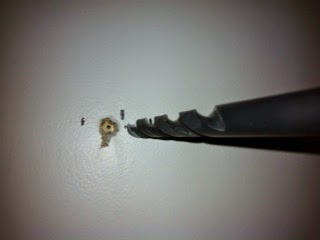
I use a 1/2 inch drill bit to bore out the hole. It stops at the stud. You can see the full stud that way to make sure you are in the middle. If the hole is off centre I move the pilot screw over.


They tell you to hand crank the bolts and use soap to reduce friction. Use a smaller 3 inch screw to make a pilot hole. You see my stud finder marks and the pilot hole. The screw will go into the center of the stud thanks to a guide path.


2. Plan for expansion when you mount it.


I found the marks for six mounting screws aligned for a larger TV. I used the rightmost two rows. You won't see the third row behind that TV and you can use it for extra mounting of shelves if you need it. You can shift the TV over to the centre.

3. They tell you to hand screw them in, but that will lead to more friction and you might wreck your work.


I use a ratchet to work in the guide hole. If the screw is not solid within 10 turns you don't have it centred in the stud or you are driving it crooked. Remove and dig into drywall more.

Then I remove the bolts to place the mounting bracket.

4. Get a kid to help hold it in place. Wives want to be the supervisor and tell you you're doing it wrong.  Kids just want to help and they are happy to hold it.


 Your prepositioned holes will make the first two go in smoother.  Take turns on the bolts. This reduces friction that might heat the bolt, switch bolts after half an inch to let them cool down. The ratchet makes it easy to snug them up to the bracket.

5. Don't worry about position until you are almost ready to snug them.


6.   You should be at this stage now.


7. Use vice grips with the screwdriver to mate bolts and nuts.  The metal they use is the bare minimum for weight, so the screw heads strip easily. I use the vice grip on the nut end to tighten not the screwdriver so it doesn't strip them as much.


8.Get that helper again and mount the TV. Turn it on before you throw anything away. Let the family clean it up, you've earned a break!


9.  Now you are ready to enjoy it.